

 Scheme
Master
Scheme
Master
Scheme
Master
Scheme
Master
|
Master > Scheme Master |
The software offers a powerful feature designed to attract customers, especially during festive seasons, by allowing you to run promotional schemes that can boost your sales. You can choose between two types of schemes to engage your customers:
- Weight-Based Scheme
- Making Amount-Based Scheme
In a Weight-Based Scheme, you can offer a gift voucher based on the weight of the items purchased, providing an added incentive for customers to buy more.
These schemes can be customized to suit your promotional goals, helping to drive customer engagement and increase sales during key periods.
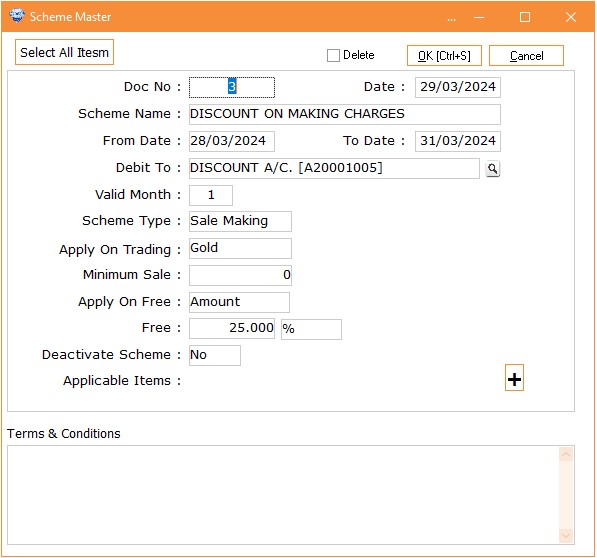
Column Details :
|
Doc No. |
It
will automatically take the Doc no. |
|
Date |
It
will take current date automatically on the Date
column. |
|
Scheme
Name |
Here
you can give a unique name of the scheme which you are
creating. |
|
From
Date |
You
have to select the date of the scheme from which your scheme will be
starting. |
|
To
Date |
You
have to select the date on which the scheme will be
end. |
|
Debit
To |
Please
select the expense account that will be affected by the adjusted gift
voucher amounts. This account will be used to record the financial impact
of gift voucher redemptions, ensuring accurate accounting and financial
reporting. |
|
Valid
Month |
Here
you have to mention the no. of months for the voucher expiry after
generating. |
|
Scheme
Type |
There
are two different types of schemes : 1.
Sale
Weight 2.
Sale
Making |
|
Apply
on Trading |
On
which trading / metal you want to apply this scheme select that metal type
here. |
|
Minimum
Sale |
If
you are making the scheme weight based then there should be minimum weight
you should enter and if you are selecting Sale Making as a type for the scheme then there
should be minimum making amount to be enter. |
|
Apply
on Free |
On
which trading you want to give the gift voucher that should be select
here. For e.g. If you are giving Silver free on Gold purchasing then here
you have to select Gold/Silver for weight based scheme or you can
select Amount option if you are creating making based
scheme. |
|
Free |
Here
you have to enter the free percentage. |
|
Deactivate
Scheme |
By
default it will be No. When the scheme will close you can set this option
to Yes to deactivate the scheme. |
|
Applicable
Items |
By
clicking on + button you have to select the no. of items applicable
for the scheme. |
|
Select
All Items |
When
you want to apply the scheme for all items then After clicking on +
buttons to add the items click on this button to select all the items
automatically. |
|
Terms
& Conditions |
In
this space you can mention your terms and conditions regarding your scheme
that will be print on Gift voucher whenever you will generate
it. |
Visual Demo :
|
Sale Weight Based Scheme |
Making Amount Based Scheme |