User Opening
Cash
User Opening
Cash
User Opening
Cash
User Opening
Cash
|
Master > User Opening Cash |
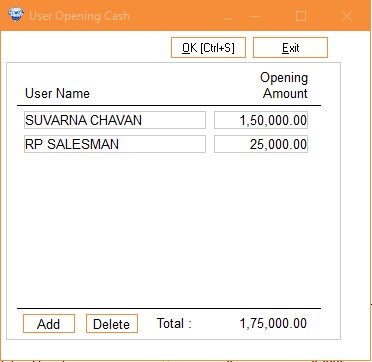
During the book close process at the end of the financial year, all account and stock closing balances are automatically transferred to the new financial year, except for the cashier's cash balances.
Year-End Cashier Balance Update Procedure
To ensure accurate financial records, follow these steps:
1. Access: Open the Cashier Balance Update screen.
2. Select Cashier: Choose the username corresponding to the cashier.
3. Enter Closing Balance: Input the cashier's closing cash balance as of March 31st (previous financial year-end).
4. Review: Verify the entered balance.
5. Confirm: Update the balance to reflect accurate cash holdings in the new financial year.