

 Item Sub Group
Master
Item Sub Group
Master
Item Sub Group
Master
Item Sub Group
Master
|
Master -> Item Sub Group Master |
Metal, Stone and Diamond Subgroup Management
Efficiently categorize precious materials into customizable subgroups, enabling detailed tracking and reporting:
Key Features
1. Predefined groups: Gold, Silver, Platinum, Stones, Diamonds
2. Subgroup creation: Bar, New Ornament, New Color Srone, New Diamond, Old Color Stone, Old Diamond
3. Assign items: Gold / Silver Coin, Gold Vedhani, Gold / Silver Biscuit etc...
4. Summary Reporting: Opening, Inward, Outward, Closing balances
5. Transaction-wise details: Item Category Ledger (GS11, GS12)
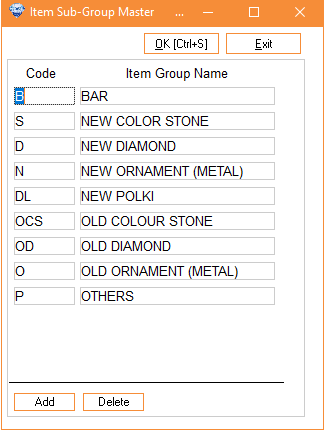
Column Details :
|
Add |
To
create a new item sub-group, click on 'Add'. |
|
Group
code |
Enter
the code for the item sub-group, e.g., "No" for a new
ornament. |
|
Item
group name |
Enter
the name of the item sub-group, e.g., "New Ornament" or "Old
Ornament." |
|
Delete |
To
delete a sub-group, select it and click 'Delete.' However, if any
transactions have been conducted for items within this sub-group, it
cannot be deleted. |