

 Customer Advance
Master
Customer Advance
Master
Customer Advance
Master
Customer Advance
Master
Master -> Customer Advance
Master
ADVANCE
Enroll Customers in Advance Schemes.
Effortlessly register customers for tailored advance schemes through our streamlined process:
1. Create an Account Master for the interested customer.
2. Select 'Customer Advance**' in the Account Master's Group column.
3. Automatically access the Customer Advance Master screen.
4. Choose the ideal scheme aligning with customer requirements.
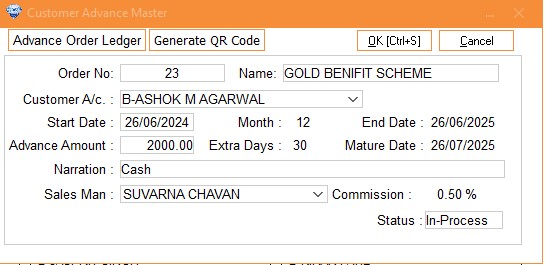
Column Details :
|
Order No. |
The
order number for the customer will be generated
automatically. |
|
Name |
Select
the scheme name from the dropdown list. |
|
Customer
A/c |
Select
Customer Account Name from drop down list. |
|
Start Date |
It
automatically defaults to the current system date, but you can also change
it if needed. |
|
Month, Extra
Days |
It will
automatically takes the Month and extra days which are entered in
respective Scheme. |
|
End Date |
It will
automatically set the end date for the scheme based on the number of
months specified in the scheme |
|
Advance
Amount |
Enter
the installment amount for the scheme. |
|
Mature
Date |
It will
automatically set the date following the end date, indicating that the
order is ready or mature for sale. |
|
Narration |
You can
enter any relevant narration or information in this
column. |
|
Sales Man |
Select
Sales Man name from drop down list. |
|
Commission |
This
option depends on the scheme you select. If the Advance Scheme
includes a commission setup for salesmen, then when you select the
salesperson’s name who approached the customer, the commission will be
automatically fetched according to the scheme’s
settings. |
|
Status |
This
column defaults to "In-Process" status. Once the item is sold, it
will automatically change to "Sale." If the customer wants to
cancel the scheme you can update the status to
"Cancel." |
Visual Demo :