

 Account Group
Master
Account Group
Master
Account Group
Master
Account Group
Master
|
Master -> Account Group Master |
This screen allows you to create custom groups and categories to organize your customers and suppliers based on their locations or other criteria. This feature offers flexibility in managing your accounts by enabling you to:
- Create branch-specific customer groups under "Sundry Debtors" for multi-branch operations
- Categorize suppliers into separate groups, such as "Expense Suppliers" and "Ornament Suppliers"
- Separate staff-related expenses, like salary and loans, under "Expenditure" for clearer financial reportingBy using this feature, you can:
- Maintain a systematic and organized record of customers, suppliers, and financial transactions
- Streamline your accounting processes and financial management
- Generate more accurate and detailed reports for better decision-makingTake advantage of this functionality to customize your accounting structure and meet your specific business needs.
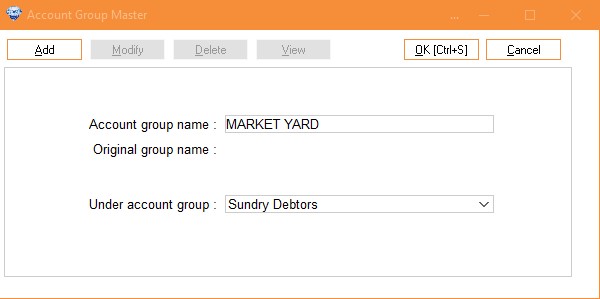
To add an account group, enter the group name, select the account groups to include from the dropdown list, and press Enter to save the account group. If creating an area as a group, select 'Sundry Debtors' Group from the dropdown list 'Under Account Group' .
|
Select Group
|
Select Account From Drop down list. (This will not be seen in addition mode.)
| |
|
Account Group Name
|
Enter Customized Group. All standard accounting groups are entered in database. You can create area wise customer group. | |
|
Under Account Group
|
If Account Group Name |
Then Under Account Group |
|
Area Name (Subash Nagar) |
Sundry Debtors | |
|
M.G. Road Area |
Sundry Debtors | |