

 Internal Stock Transfer
Internal Stock Transfer
Internal Stock Transfer
|
Counter -> Internal Stock Transfer |
Item Conversion Voucher: Efficient Inventory Management
This screen enables the conversion of one item to another within the same trading category, ensuring seamless inventory tracking. Key features:
- Intra-trading conversions only (e.g., gold to gold, silver to silver)
- Prohibits inter-trading transfers (e.g., gold to silver)Utilize this voucher in three scenarios:
1. Separate received new gold/silver ornaments by metal type.
2. Transfer old labeled stock to Old Gold for melting purposes.
3. Convert item-wise RNG stock to Old Gold for melting.
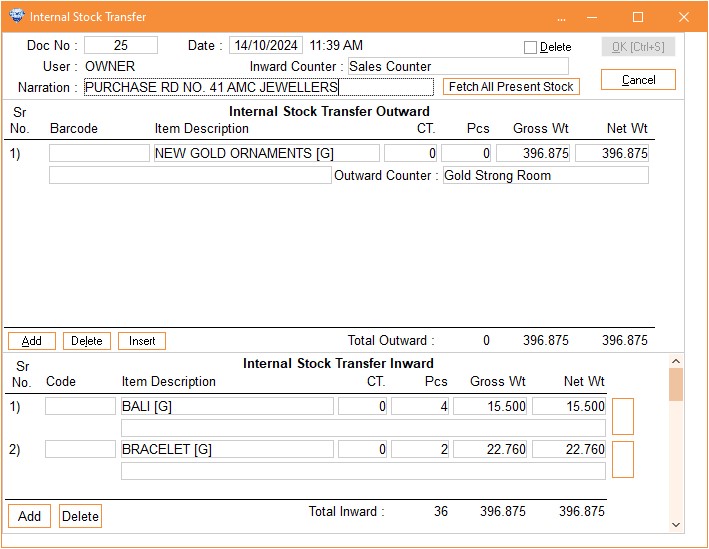
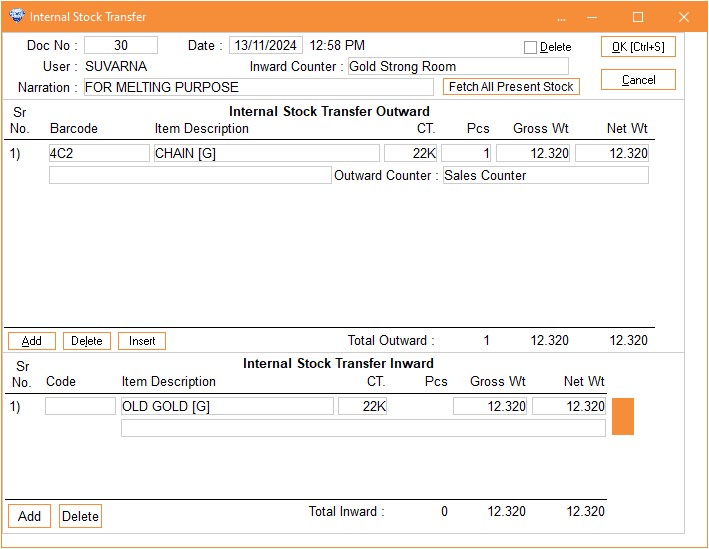
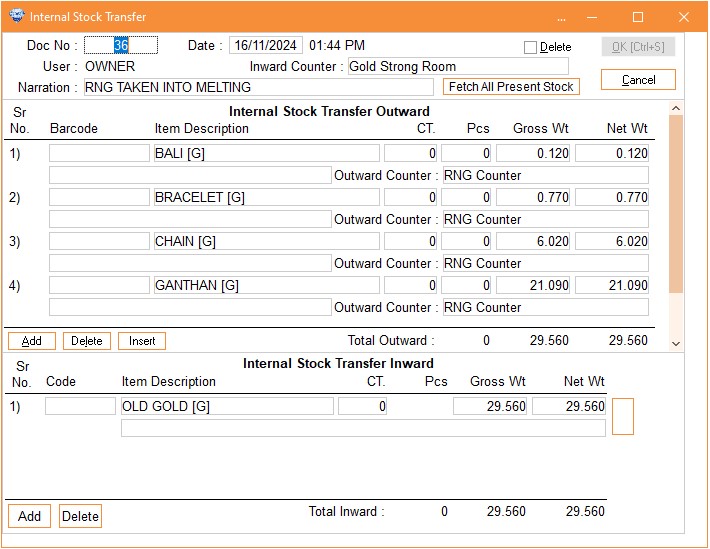
Second thing when you want to remove all the stock of one counter and merge with single item or different items on another counter, you can achieve this by selecting the counter from which you want to remove the stock in Inward Counter and click on Fetch All Present Stock. It will fetch all the stock available on the selected counter. Another thing if you want to do this metal wise or you want only single trading stock to be removed then you have to enter the code of trading in the Narration Column For Eg. if you want to remove the stock of Gold then you have to enter G in the Narration column like that, for Silver enter S, for Diamond enter D, for Fixed Price Item enter F, for Stone items enter T and for Platinum items enter P . After fetching the stock you can change the Inward Counter to the specific counter on which you want to trasnfer this stock.
Column Details :
|
Internal stock Transfer Outward | |
|
Barcode |
If you want
to transfer the labelled item stock to old gold stock Sales then scan or
enter the barcode in this column. |
|
Item
Description |
Select
particular item which you want to transfer. For e.g. Chain, Bracelet,
Bangles or New Gold Ornaments. |
|
Narration |
Here you can
enter any narration about the selected item. |
|
Caret |
Select
particular Carat. |
|
PCS |
Enter the
pieces. |
|
Gross
Wt. |
Enter Gross
weight of selected item. |
|
Net
Wt. |
Enter the net
weight of item. |
|
Outward
Counter |
You can
select particular counter where you want to transfer this old gold or
sorted gold. |
|
Internal
stock Transfer Inward | |
|
Item
Description |
Select
particular item which you want to transfer. For e.g. Chain, Bracelet,
Bangles or New Gold Ornaments. |
|
Narration |
Here you can
enter any narration about the selected item. |
|
Caret |
Select
particular Carat. |
|
PCS |
Enter the
pieces. |
|
Gross
Wt. |
Enter Gross
weight of selected item. |
|
Net
Wt. |
Enter the net
weight of item. |
Note : For Internal Stock Transfer the total Gross Wt & Net Wt of Inward Counter and Outward Counter should be match. Then & then only you can save the voucher.