

 Making Category
Master
Making Category
Master
Making Category
Master
Making Category
Master
|
Master -> Making Category Master |
This screen is particularly useful when creating labels, as it allows you to easily update making charges in response to daily fluctuations in metal rates. Previously, when rates were low, making charges were applied on a per-gram and per-piece basis. However, with increasing rates, it's essential to adjust making charges accordingly.
To simplify this process, we've introduced a making category master. This feature enables you to categorize and apply making charges to labels efficiently. When you need to modify making charges, you can simply update the master category, eliminating the need to manually change each label. This streamlined approach saves time and effort, ensuring your labels remain accurate and up-to-date.
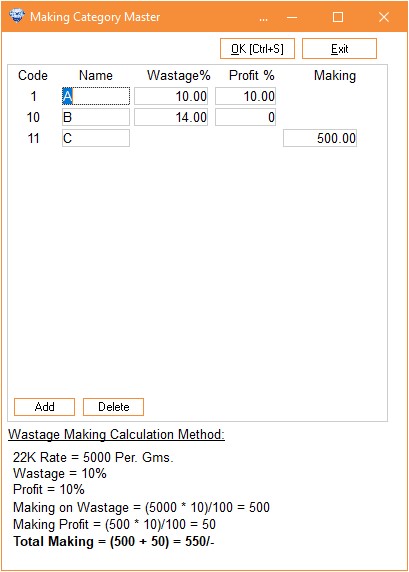
When creating a making category, you can assign a specific name in the 'Name' column, which will be printed on labels for easy identification.
Note that you can apply making charges in one of two ways:
- Wastage + Profit Percentage
- Making AmountPlease select one option at a time, as only one method can be used simultaneously. This ensures accurate calculations and label printing.
You can also watch our step-by-step guide on how to use the Making Category Master in the Visual Demo section below.
Visual Demo :