Rate
Master
Rate
Master
Rate
Master
Rate
Master
|
Master -> Rate Master |
To
do daily sale & purchase it is necessary to update the rate in rate
master.
2. Select
the gold in select metal column.
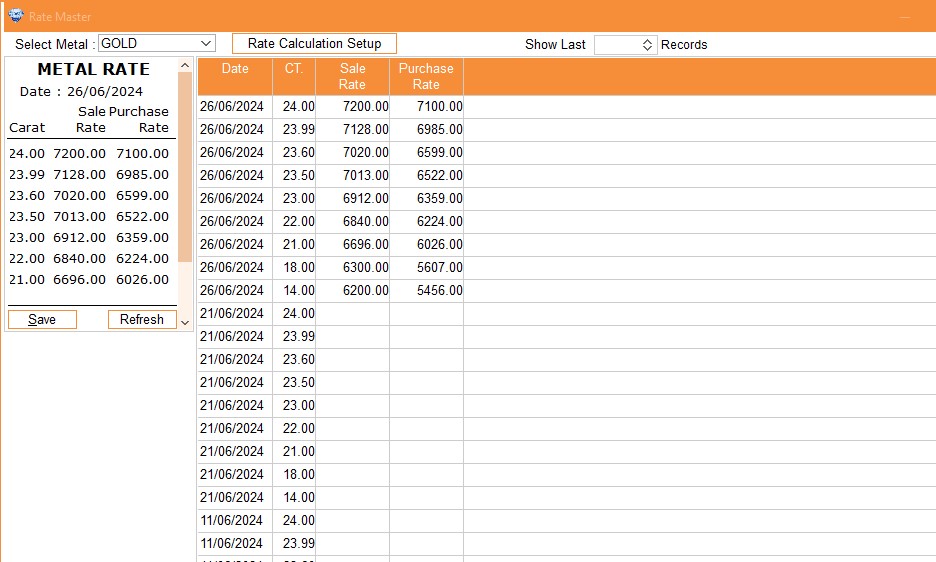
3. Type Current Sale & Purchase rate.
5. Click on Save to save rate.
Do same process as above for Purchase Rate.
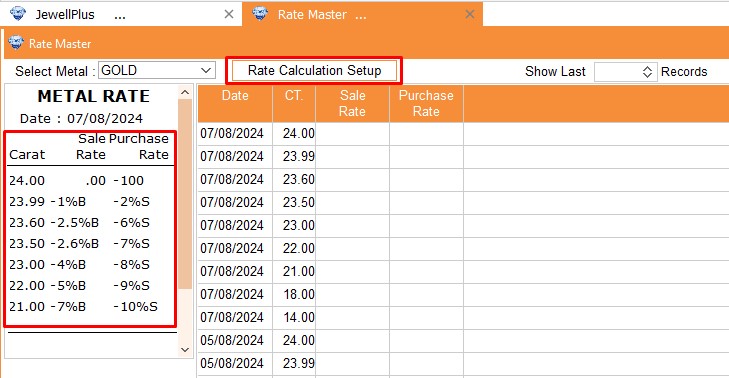
Customize your rate calculation setup in the Rate Master software by clicking on the 'Rate Calculation Setup' button. This feature allows you to configure formulas for different karat weights, tailoring the calculation to your specific needs.
Follow the step-by-step instructions in the accompanying video to set up your custom formula in the Rate Calculation Setup. The video tutorial will guide you through the process, ensuring a seamless configuration of your rate calculation settings.
Access a comprehensive rate history on the same screen, allowing you to easily track changes in rates over time. Simply navigate to the 'Rate History' section to view the rate of a specific karat on a particular date.
Additionally, you can customize the display to show a specified number of records, such as the last 100 entries. Just enter the desired number in the 'Show Last' field and press enter to retrieve the corresponding details.
Visual Demo